A phone system for accounting firms, inside your practice platform
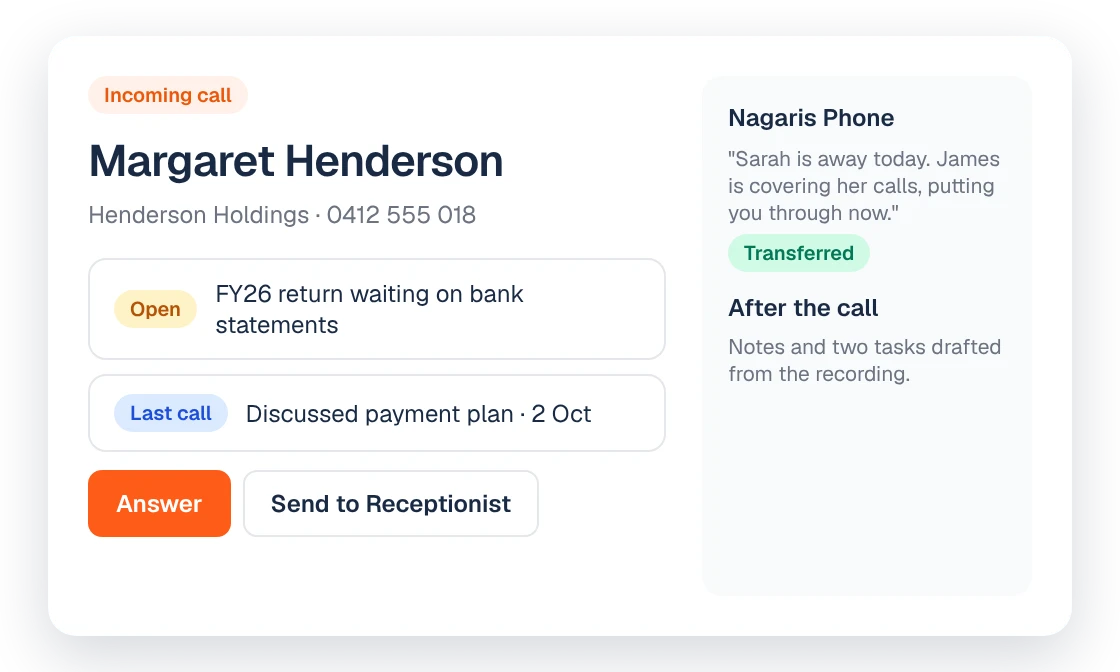
Nagaris Phone moves your firm's existing numbers into Nagaris, so the client's file is on screen when they ring and the call lands on their timeline. Inbound calls are recorded after a message tells the caller, and outbound recording stays off unless you turn it on.
What it does
Most firms run their phones on one system and their client records on another. Someone answers, asks who is calling, then goes looking for the file. After the call, the notes live in a notepad, an email to self, or nowhere.
Nagaris Phone closes that gap. We port your existing phone numbers across, so every call works inside Nagaris. When a client rings, their file is on screen before you pick up. You can click to call from the client record. Recorded calls are written up for you, with notes and tasks, and every call sits on the client's timeline beside their emails, texts and meetings.
AI receptionist
The AI receptionist answers, takes messages and puts callers through to the right person. It works 24/7, so a client ringing at 7pm in the middle of tax time still reaches someone who can take the message and route it.
Keep your numbers
Clients don't need to learn a new number. We move your existing numbers across for you, and calls in and out keep using your firm's own number.
Who it's for
Firms where the phone is still how a lot of client work starts: the partner who takes a call about a trust distribution, the admin team fielding "did you get my documents", the reception desk that can't always answer every line at 9am on a Monday. It suits firms that want the call record on the client, not in a separate phone app.
How it fits with the rest of Nagaris
Calls are one part of the client file. Texts sent from your firm number through Shared SMS land beside them, and the meeting notetaker puts meetings on the same timeline. Because the call notes are on file, Ask Nagaris can use them when it answers a question or drafts the reply email. Teammates can pick up the follow-up in the client's room in Client Rooms.
Pricing
| Item | Price |
|---|---|
| Nagaris Phone: unlimited Australian calls, your own number, recording and call notes | $59 a user a month |
| AI receptionist: answers, takes messages and transfers, 24/7 | 50 cents a minute |
How call recording works
Recording follows the direction of the call.
- Inbound calls. Every inbound call is recorded. A message at the start tells the caller the call is recorded before anyone answers.
- Outbound calls. Recording is off by default on every outbound call. The accountant turns it on for that call only after the other person has agreed to be recorded.
Recorded calls are written up with notes and tasks and filed on the client. Calls that aren't recorded still sit on the client's timeline.
A note on recorded calls and privacy
Call recordings and notes contain personal information. Under the Australian Privacy Principles, APP 11 requires an APP entity to take reasonable steps to protect personal information it holds from misuse, interference and loss, and from unauthorised access, modification or disclosure (OAIC, APP quick reference). Rules about recording calls vary between states and territories, which is why inbound calls carry a recorded notice and outbound recording needs the other person's agreement. Check the position for your firm.
Questions
Can we keep our existing phone numbers?
Yes. Nagaris ports your existing numbers across to Nagaris Phone, so clients keep calling the numbers they already know.
How much does Nagaris Phone cost?
Unlimited Australian calls, your own number, recording and call notes are $59 a user a month. The AI receptionist is 50 cents a minute.
What does the AI receptionist do?
It answers calls, takes messages and puts callers through to the right person, 24/7.
Are calls recorded and written up?
Inbound calls are recorded after a message tells the caller. Outbound calls are not recorded unless the accountant turns recording on for that call, after the other person agrees. Recorded calls are written up with notes and tasks and filed on the client.
Can I see who is calling before I answer?
Yes. The client's file is on screen when they ring, and you can click to call from the client record.
Sources
See Nagaris in action
A 30-minute walk-through with your own clients and questions.
Schedule a demo