Every job, one list, nothing missed
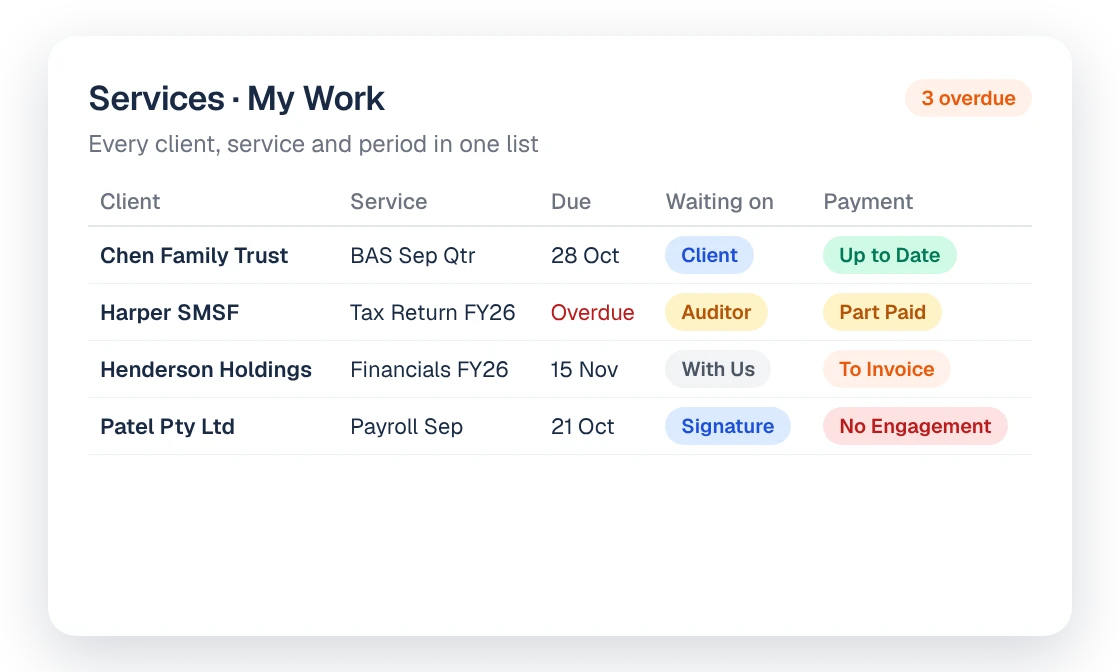
Nagaris Workflow puts every client, service and period on one Services list, showing who each job is waiting on and whether it's billed and paid. Jobs are created from the engagement when the client signs, and every job is checked against engagements and invoices so unbilled work shows up.
The signature starts the work
When a client clicks Accept on their engagement, they sign and set up payment in the same step. Jobs, services and budgets are created from the engagement line items, and tasks are assigned to your team's queue. That can happen in XPM, with the correct templates, budgets, staff allocations and tasks, or straight from the engagement if you'd rather not run a job layer at all. Nobody re-keys anything, and every action is timestamped.
One Services list
The Services list shows every client, service and period in one place. Saved views cover the questions people ask most:
- My Work: what's on my plate
- Overdue: what's late
- With Client: what we're waiting on the client for
- To Invoice: what's done and not yet billed
The Waiting On column shows whether a job is with the client, a signer or a third party. When a manager asks why a return hasn't moved, the answer is on the row.
Billing read, not typed
Billing and payment status come straight from the engagement and its invoices. Nobody updates a column to say a job has been billed. Payments by direct debit, card or PayID are matched to the invoice for you.
Missed work found
Every job is checked against your engagements and invoices. Work with no engagement behind it, or work that's finished but hasn't been billed, shows up rather than slipping through.
Moving from another system
We bring your existing job lists across for you and check every item against your engagements and invoices. Clean rows go across in one click. Anything that needs a decision, such as work with no engagement or work that hasn't been billed, is listed for you. Fixed rules make every call, not AI.
If you use XPM, the integration is bi-directional: changes made in Nagaris appear in XPM within seconds, and XPM changes appear in Nagaris about every 10 minutes during business hours.
Who it's for
Practice managers who want one view of every job in progress, and partners who want to see what's finished but not billed.
How it connects to the rest of Nagaris
Jobs start from group proposals. Payments flow from Payments. Questions like "every outstanding task across the team" go to Ask Nagaris, and WIP, lock-up and jobs over budget sit in firm reports. Time drafted by the Time Tracker can be moved to the right engagement in a click. If you're reviewing how you price the work itself, see the pricing accounting services guide.
What it costs
Workflow is included in every plan, along with profitability tracking and unlimited invoices. Plans start at $495 a month for up to 500 active clients.
Questions
Do we have to use XPM?
No. Nagaris can create jobs in XPM, or run engagements and services without a job layer, with invoices and costs straight from the engagement.
How does Nagaris sync with XPM?
Changes in Nagaris appear in XPM within seconds, and XPM changes appear in Nagaris about every 10 minutes during business hours.
Can you move our existing job list?
Yes. We bring it across, check every item against your engagements and invoices, and list anything that needs a decision. Fixed rules make every call, not AI.
How does it find unbilled work?
Every job is checked against your engagements and invoices, so finished work that hasn't been billed shows up.
Can we see who a job is waiting on?
Yes. Waiting On shows whether a job is with the client, a signer or a third party.
See Nagaris in action
A 30-minute walk-through with your own clients and questions.
Schedule a demo